OrdenZ
OrdenZ

Self-order kiosk & POS for cafes.

Connect counter billing, self-order kiosks, kitchen tickets and owner reports. Configure the menu, payment method and staff roles for your cafe, then test a full service before going live.

Free to start · 30-day Pro trial · No card needed
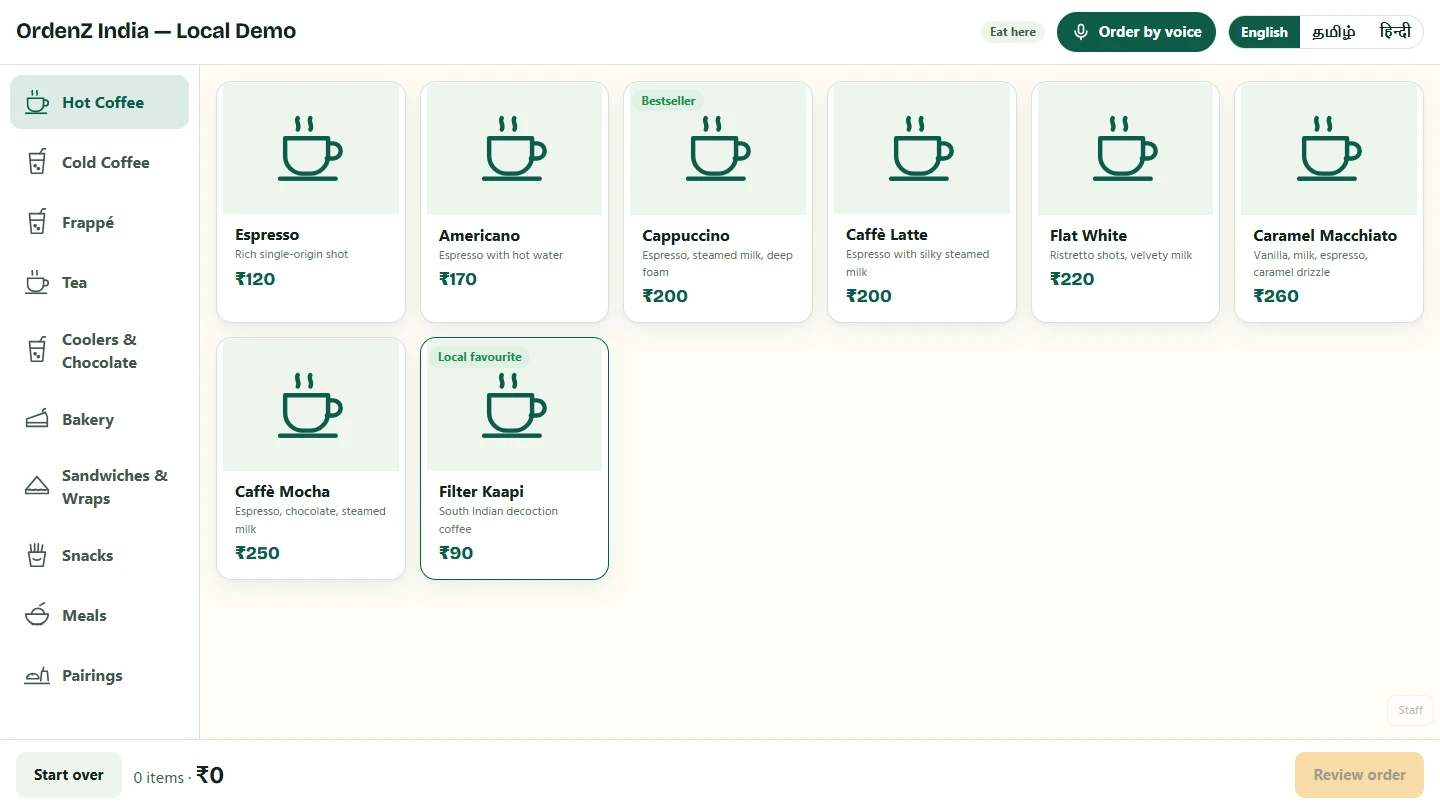
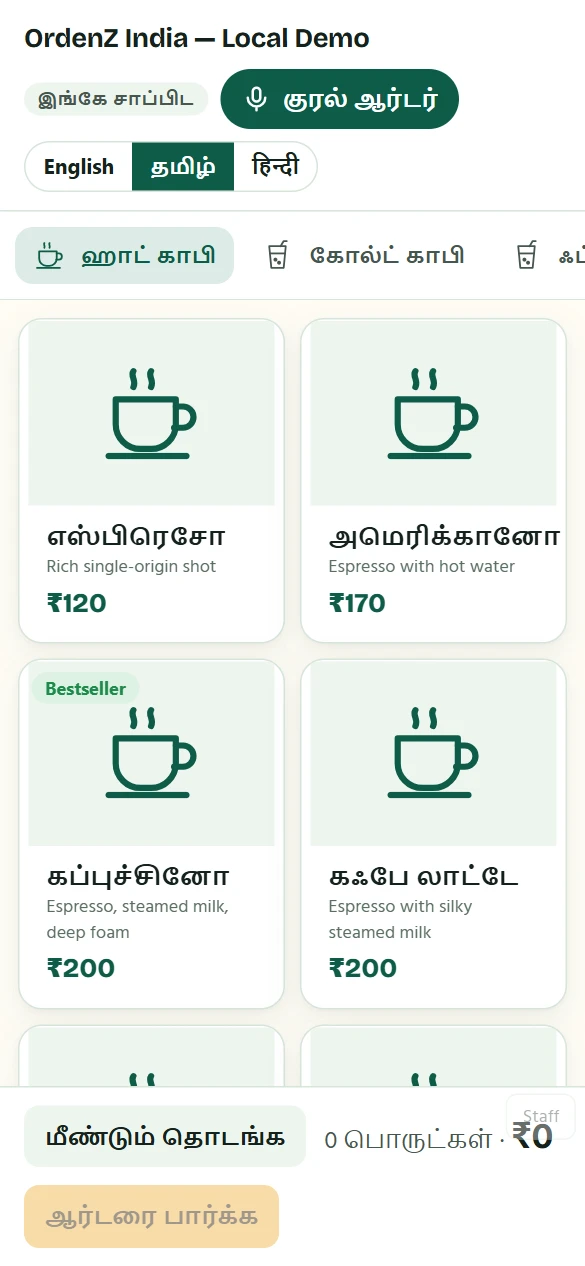
OrdenZ self-order kiosk menu
The kiosk menu in Tamil
Self-order kiosk8 languagesIndia & MalaysiaVoice orderingUPI auto-confirmKitchen displayToken screenGST billingThermal printingWorks offlineRecipes & stockBulk & cateringTableTurn bookingsStaff starsTeam rolesSupplier invoicesWastageExcel menu setupItem photosLoyaltyWhatsApp offersReferral rewardsAndroid app
Everything a cafe needs

From the first tap to the closing report

Self-order kiosk

Customers order themselves

  • Photo menu in English, தமிழ், हिन्दी, తెలుగు, മലയാളം or ಕನ್ನಡ: choose up to four for your kiosk
  • Add item photos, or set up menu items, options and recipes from Excel
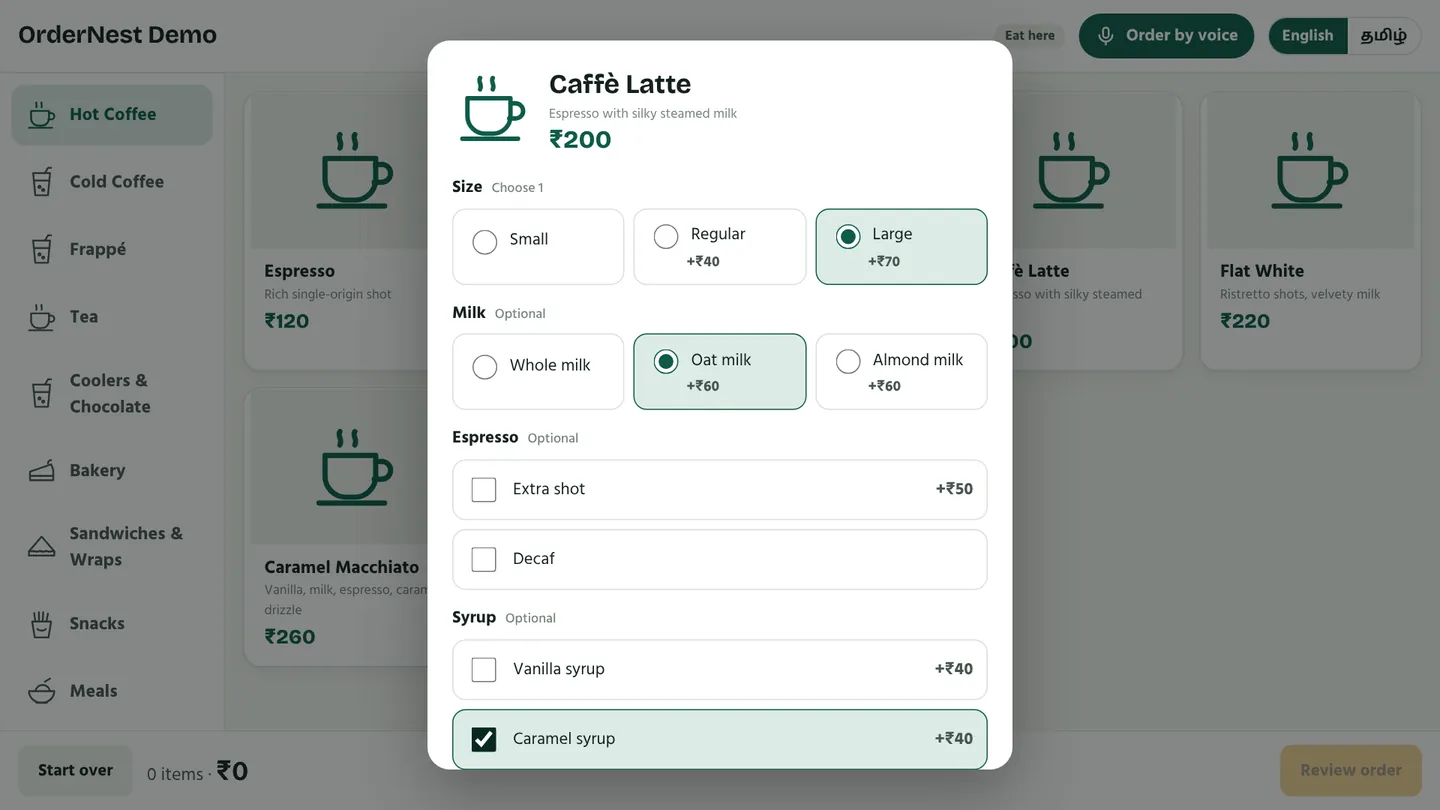
  • Sizes, milk, extra shots, syrups and toppings
  • "Would you like to add?" suggestions raise every bill
  • Dine in or takeaway, with a token number
Choosing size, milk and syrup for a Caffè Latte
Voice & AI ordering

Just say the order

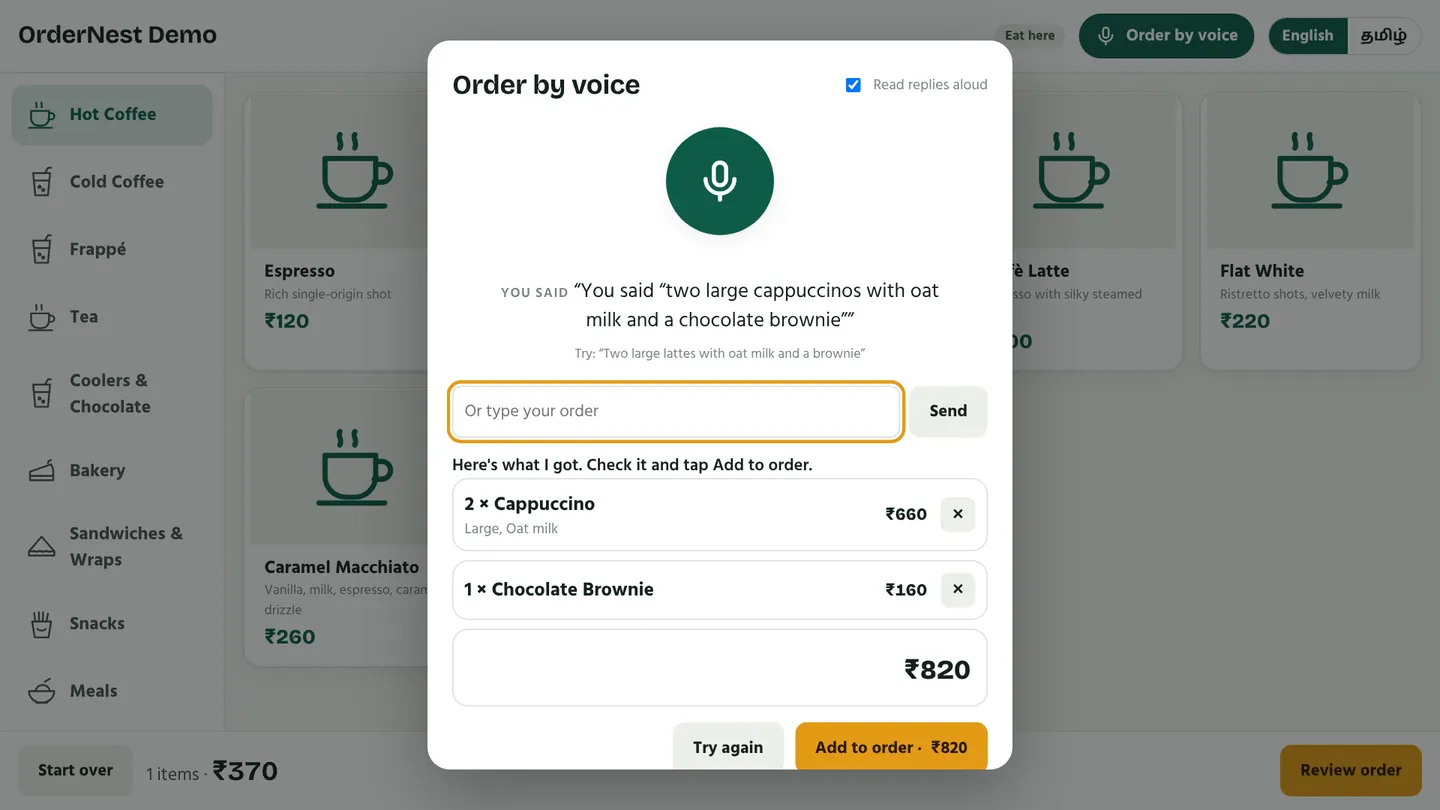
  • "Two large cappuccinos with oat milk and a brownie"
  • Understands English, Tamil and Tanglish, and with AI also Hindi, Telugu, Malayalam and Kannada
  • The customer checks it and taps Add, so nothing goes wrong
Voice order turned into a cart
UPI payments

Paid, and confirmed by itself

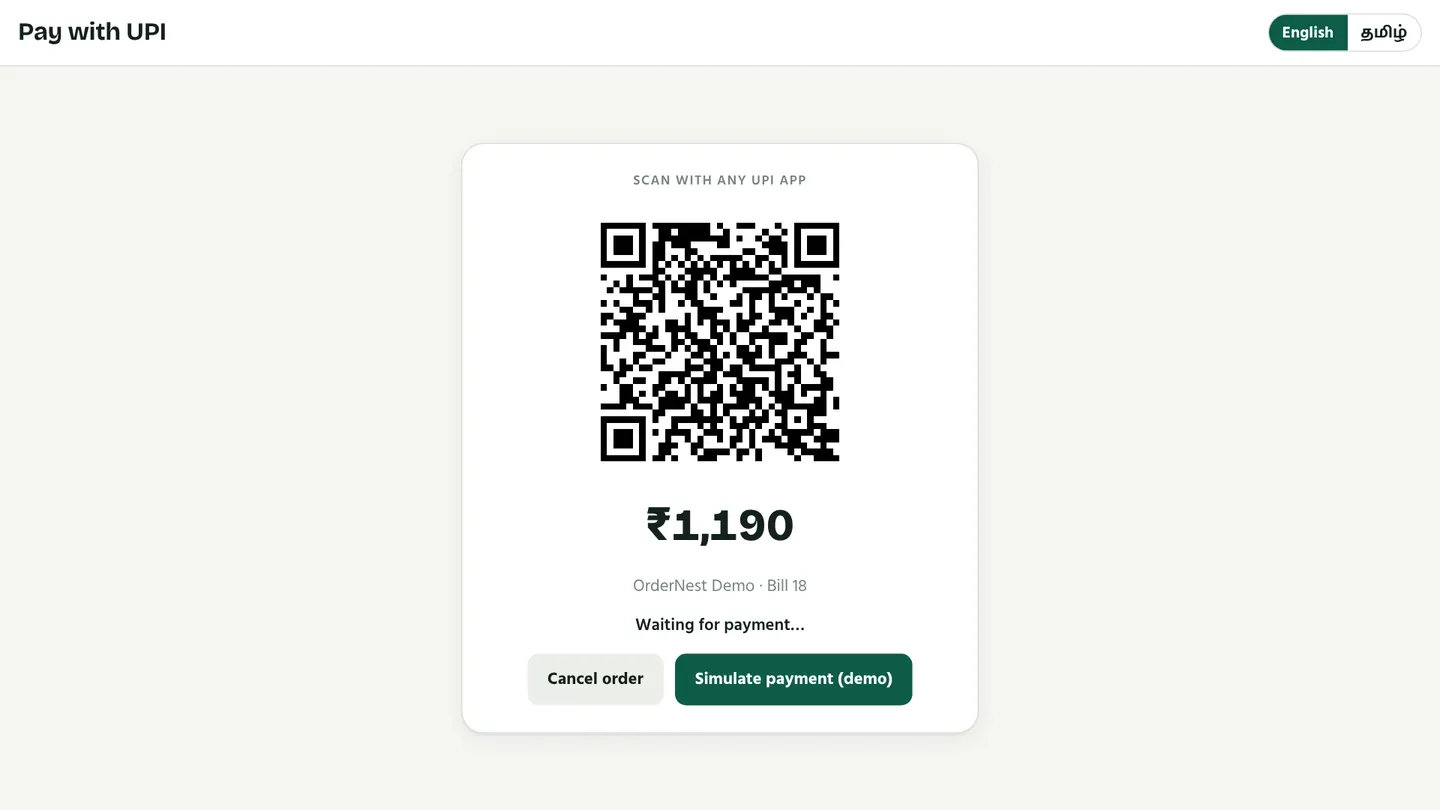
  • A UPI QR for the exact amount on every order (Razorpay or PhonePe)
  • Payment is confirmed automatically; no one checks a phone
  • Wrong or late payments show up for a one-tap refund
  • Cash and card at the counter too
UPI QR code for the exact order amount
Kitchen & token screen

Straight to the kitchen

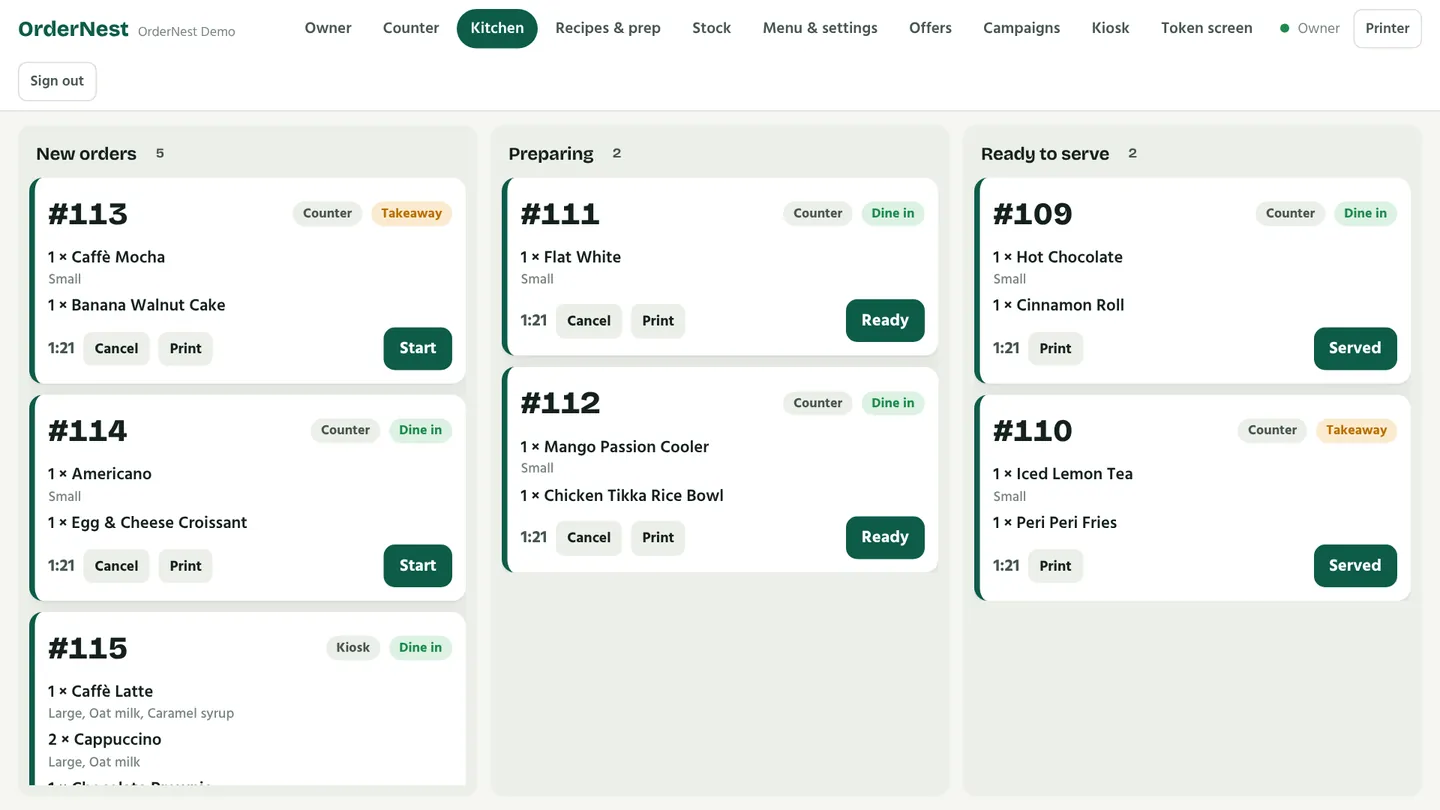
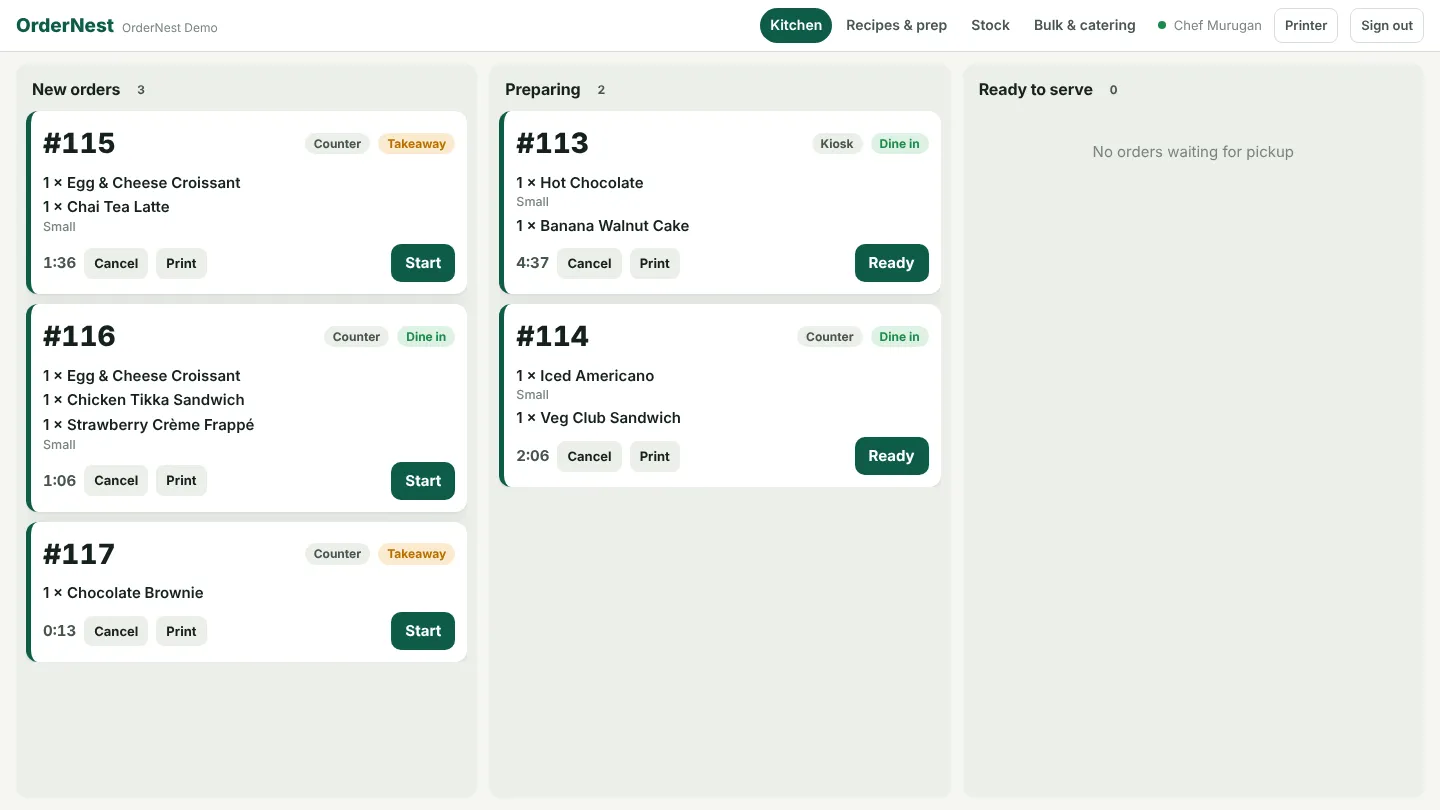
  • Live tickets: New → Preparing → Ready
  • Colour warnings for orders that are waiting too long
  • Token numbers on any TV, in English and Tamil, with a chime
Kitchen display with live order tickets
Counter POS & printing

GST bills in seconds

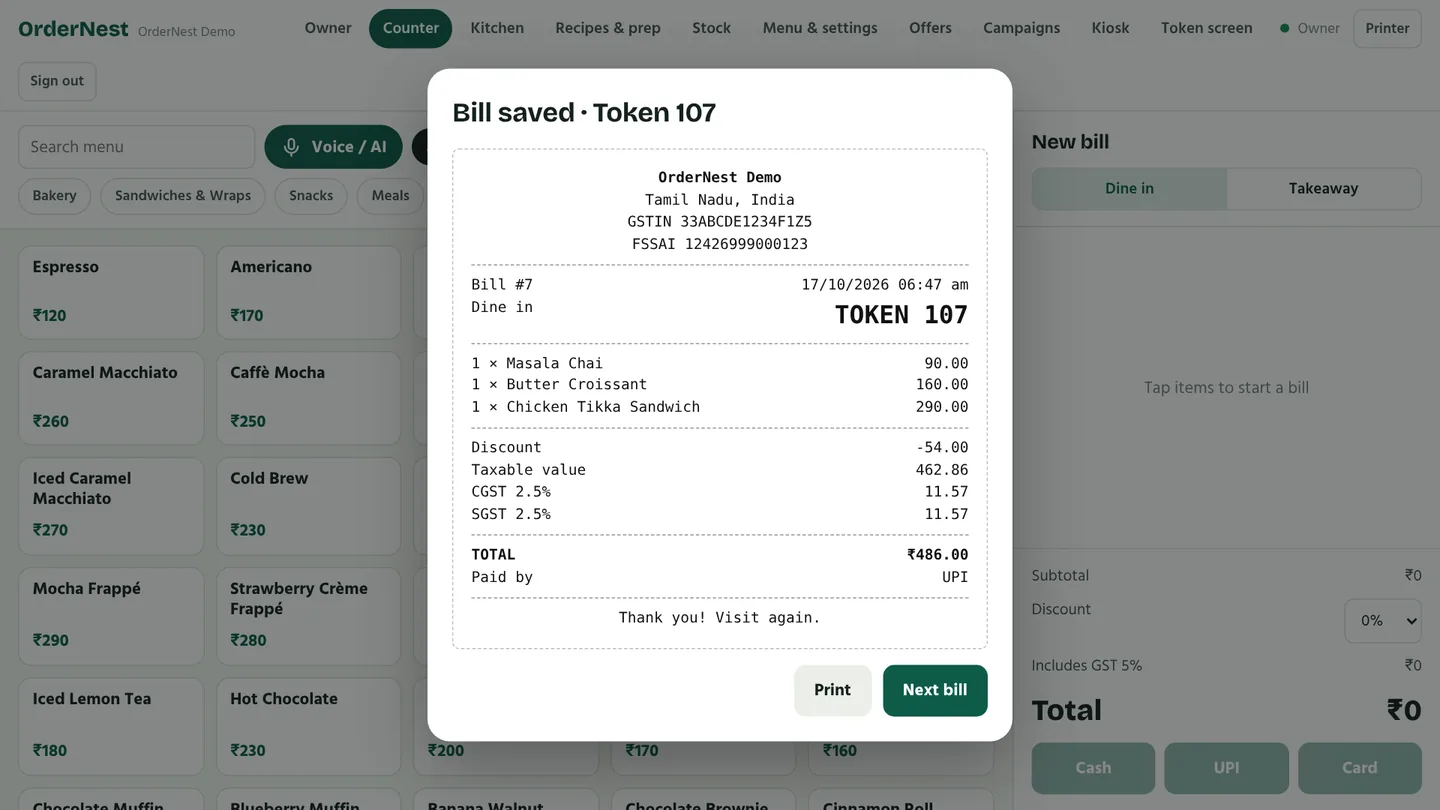
  • Fast billing with discounts, cash, UPI and card
  • GST receipts with CGST and SGST
  • Compatible Bluetooth and network thermal printers (58 mm and 80 mm); test your printer and cash-drawer setup before launch
GST receipt on the counter screen
Offline billing

Internet down? Keep billing.

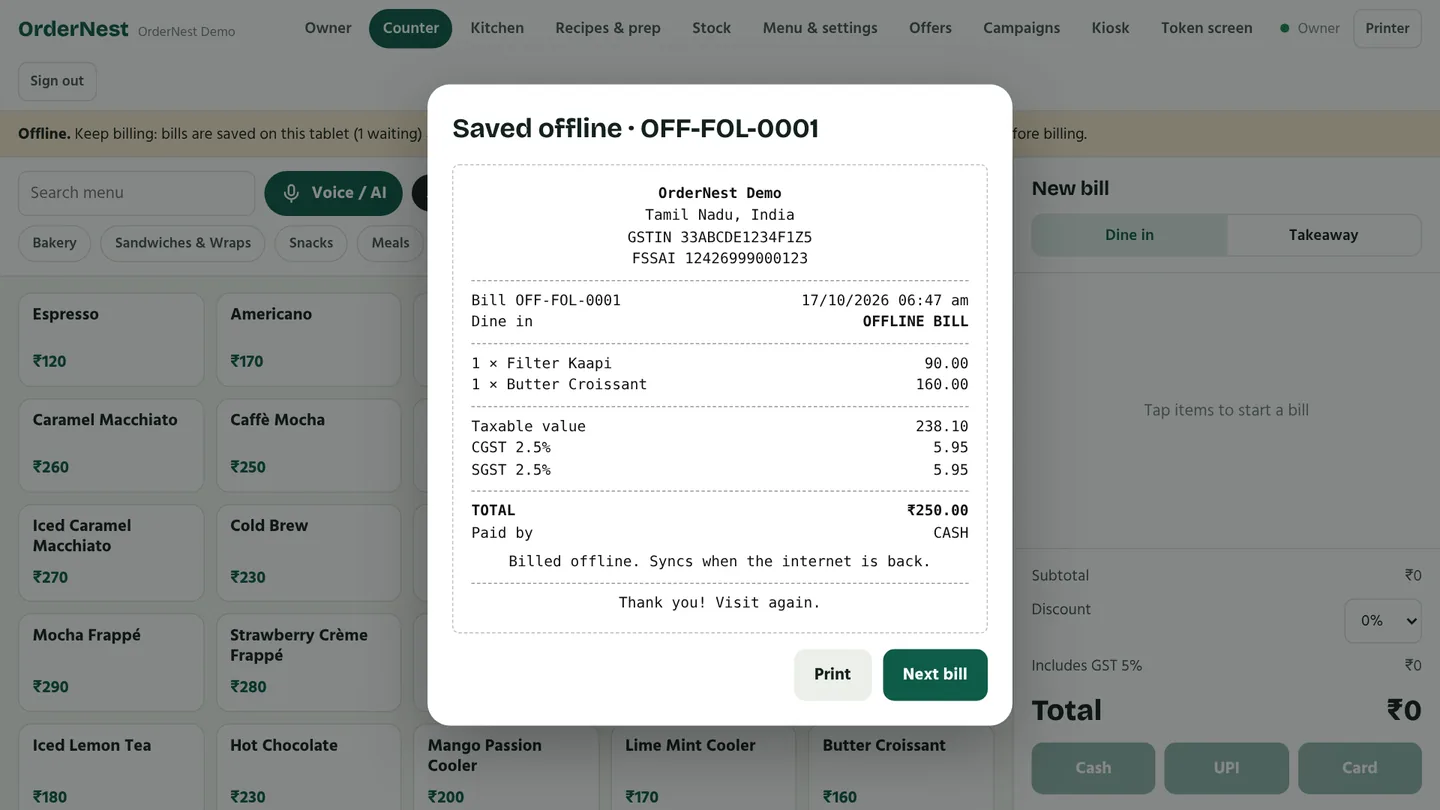
  • Bills are saved on the tablet with an offline number
  • They sync automatically when you're back online, never twice
  • Receipts still print
A bill saved while offline
Recipes & stock

Every plate the same, every rupee counted

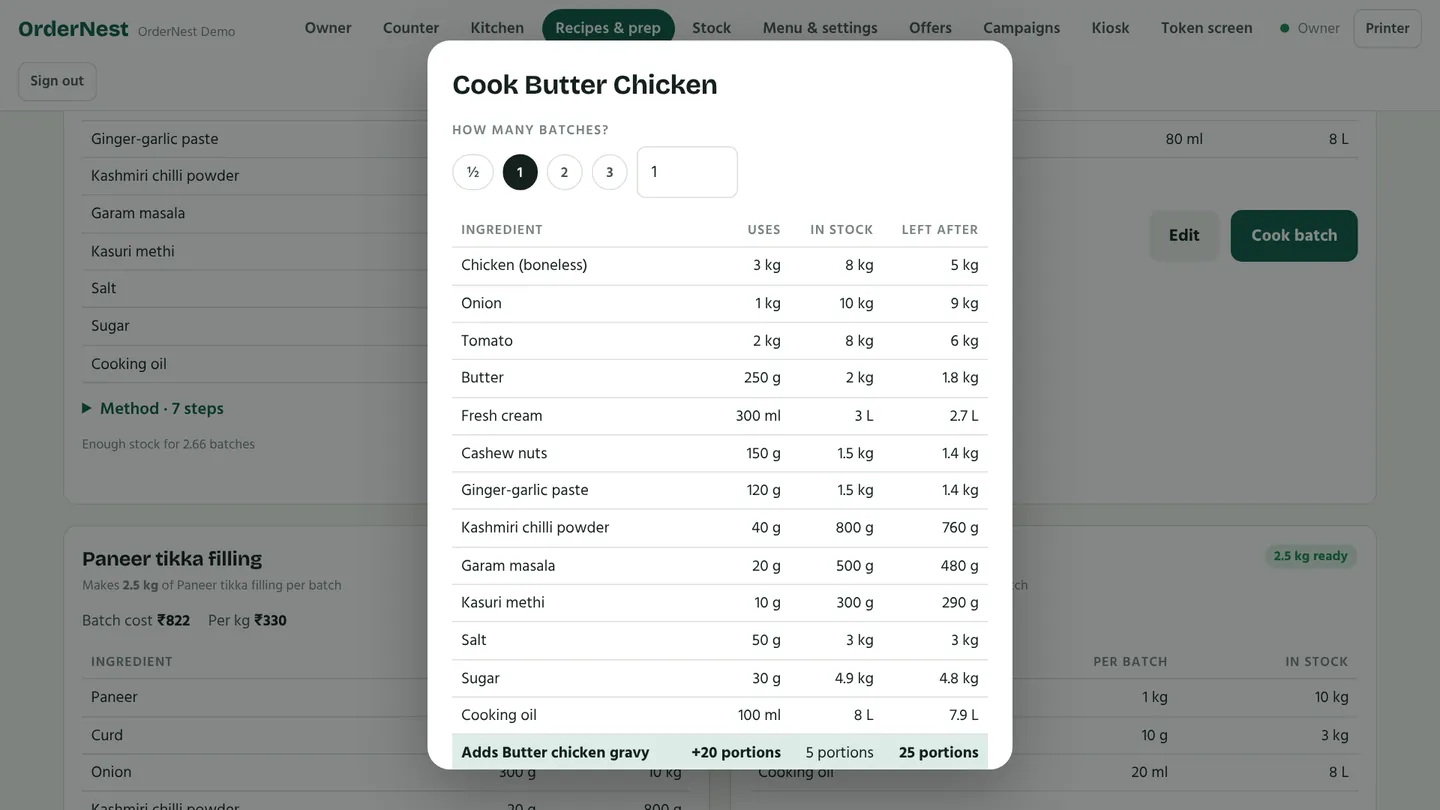
  • Standard recipes: Butter Chicken, 3 kg chicken, 1 kg onion… 20 portions
  • Cook a batch and the stock updates itself
  • Cost per plate and food-cost %
  • Low-stock alerts; sold-out items hide themselves
Cooking a batch of a standard recipe
Owner dashboard

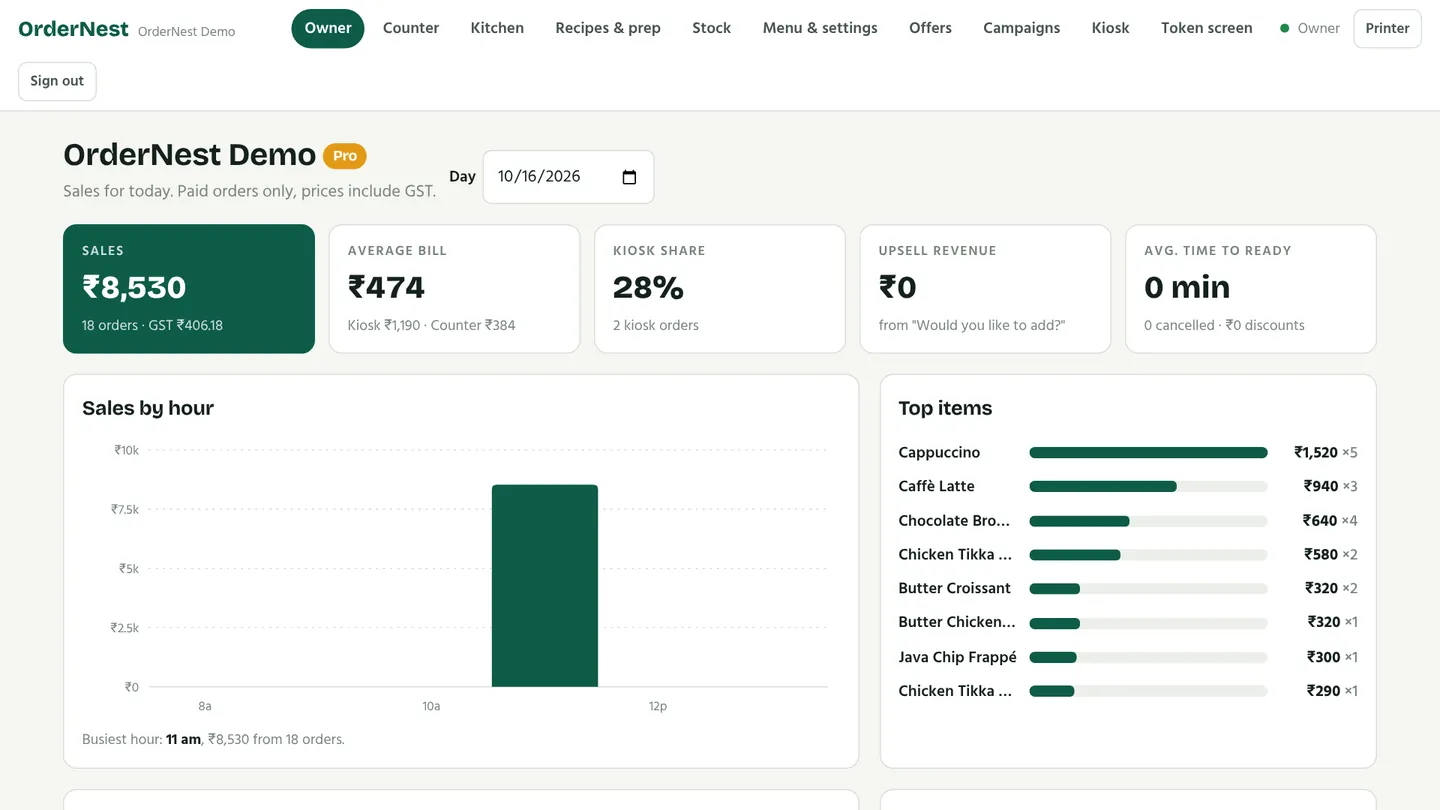
Your cafe at a glance

  • Sales, average bill, peak hours and top items
  • Kiosk share and upsell revenue
  • Daily summary ready for WhatsApp
  • Manage and lock your tablets remotely
  • On Pro, manage everything from any laptop browser
Owner dashboard with today's sales
Bulk & catering

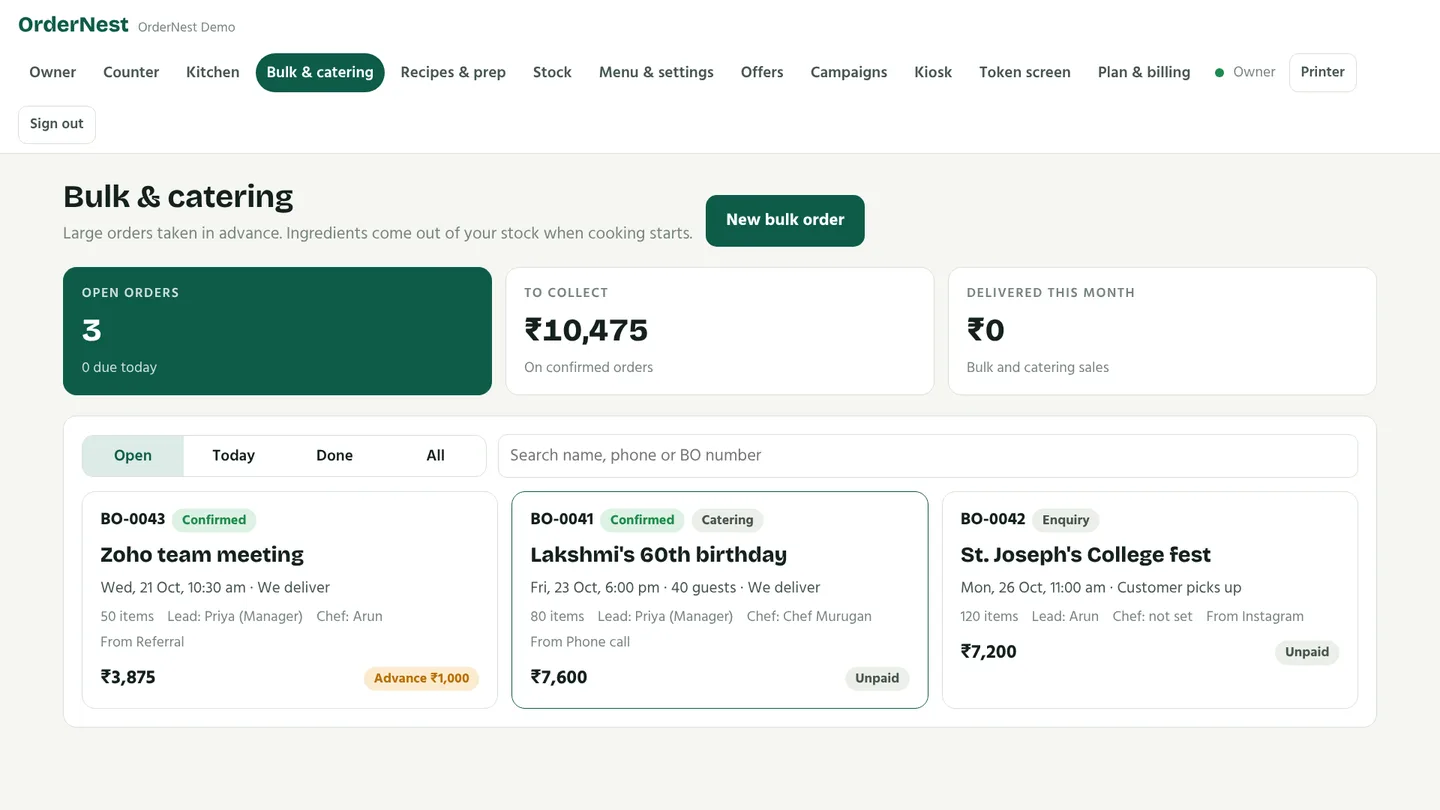
Office lunches, parties, weddings

  • Note who ordered and where from: WhatsApp, Instagram, phone or referral
  • Guests, venue, and pickup, delivery or on-site service
  • Assign the person responsible and the chef
  • Bulk prices, live counters and service charges
  • See exactly what stock to buy; it comes out of your normal stock when cooking starts
  • Advance and balance payments, WhatsApp confirmation, kitchen sheet
Bulk and catering orders with dates, team and payment status
TableTurn

Every table ready, every team member noticed

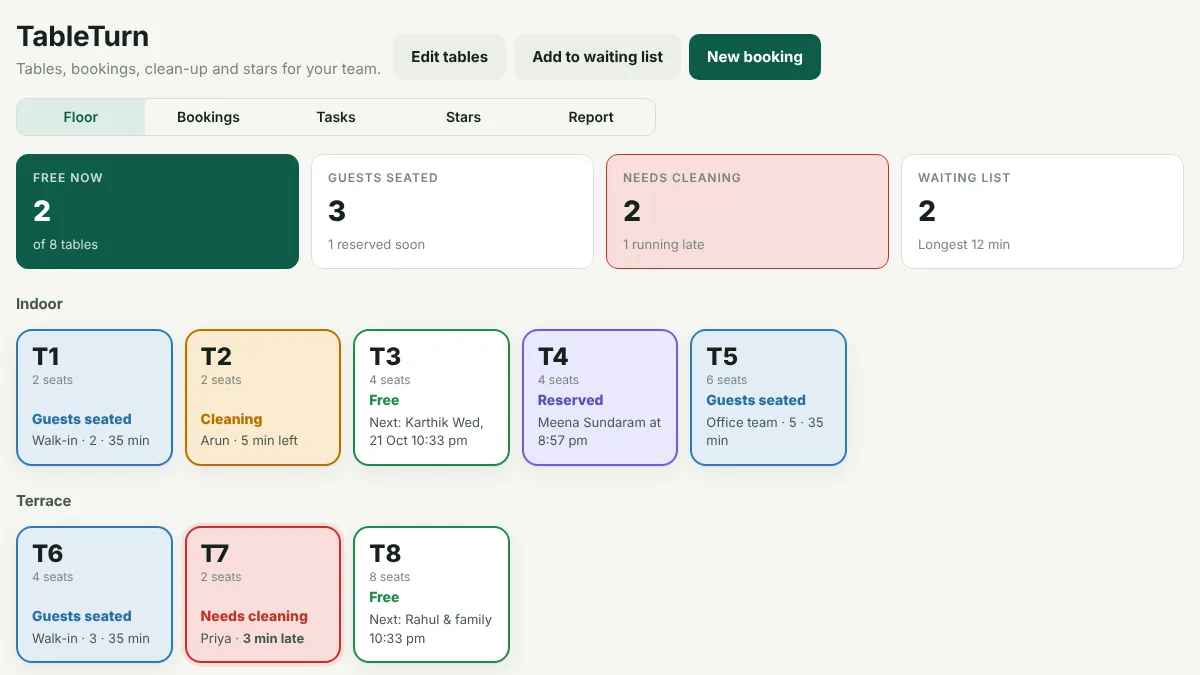
  • See every table at a glance: free, reserved, seated or needs cleaning
  • Bookings with no double-booking, the right-size table suggested, and a waiting list
  • Guests leave, and the clean-up job goes to the least busy person automatically
  • A fresh photo of the clean table frees it for the next guests; the owner can send it back
  • Customers give staff a star from the QR code on their bill
  • Leaderboards, star of the month, and how fast your tables turn
TableTurn floor view with free, reserved, seated and cleaning tables
Team roles

Everyone sees only their job

  • Owner, manager, captain, chef, cashier, store keeper and cleaning staff
  • Each person signs in with their own PIN
  • The chef sees the kitchen, the cashier the counter, the cleaner their clean-up jobs
  • Managers run the day but can't touch your plan, billing or other managers
  • Switch someone off and their tablet stops working within seconds
  • An activity log shows who changed prices, stock, refunds and settings
The chef's view: only the kitchen, recipes, stock and bulk orders
Suppliers & invoices

Every supplier bill, matched to your stock

  • Enter the bill when the delivery comes: items, quantities, cost and GST
  • Stock goes up and the cost of every recipe updates by itself
  • Keep a photo of the bill for your GST records
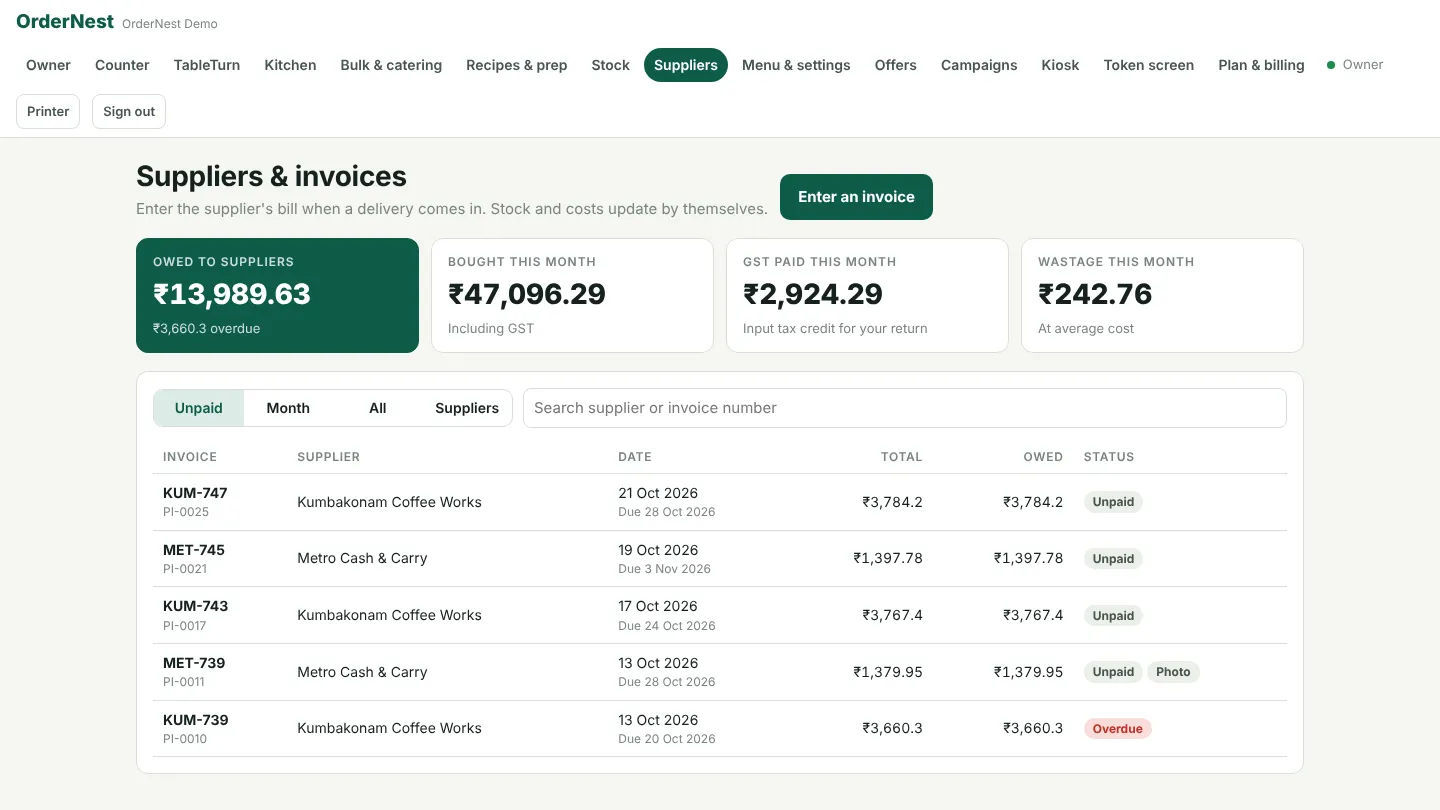
  • See what you owe each supplier, and what's overdue
  • GST paid this month, for your input tax credit
  • Record wastage with a reason, and see what it cost
Suppliers and invoices: owed, bought this month, GST and wastage
India and Malaysia

Bills the way your country does them

  • Choose your country when you sign up: currency, taxes, bill format and kiosk languages follow it
  • India: prices include GST, with CGST and SGST on every bill, GSTIN and FSSAI, and UPI
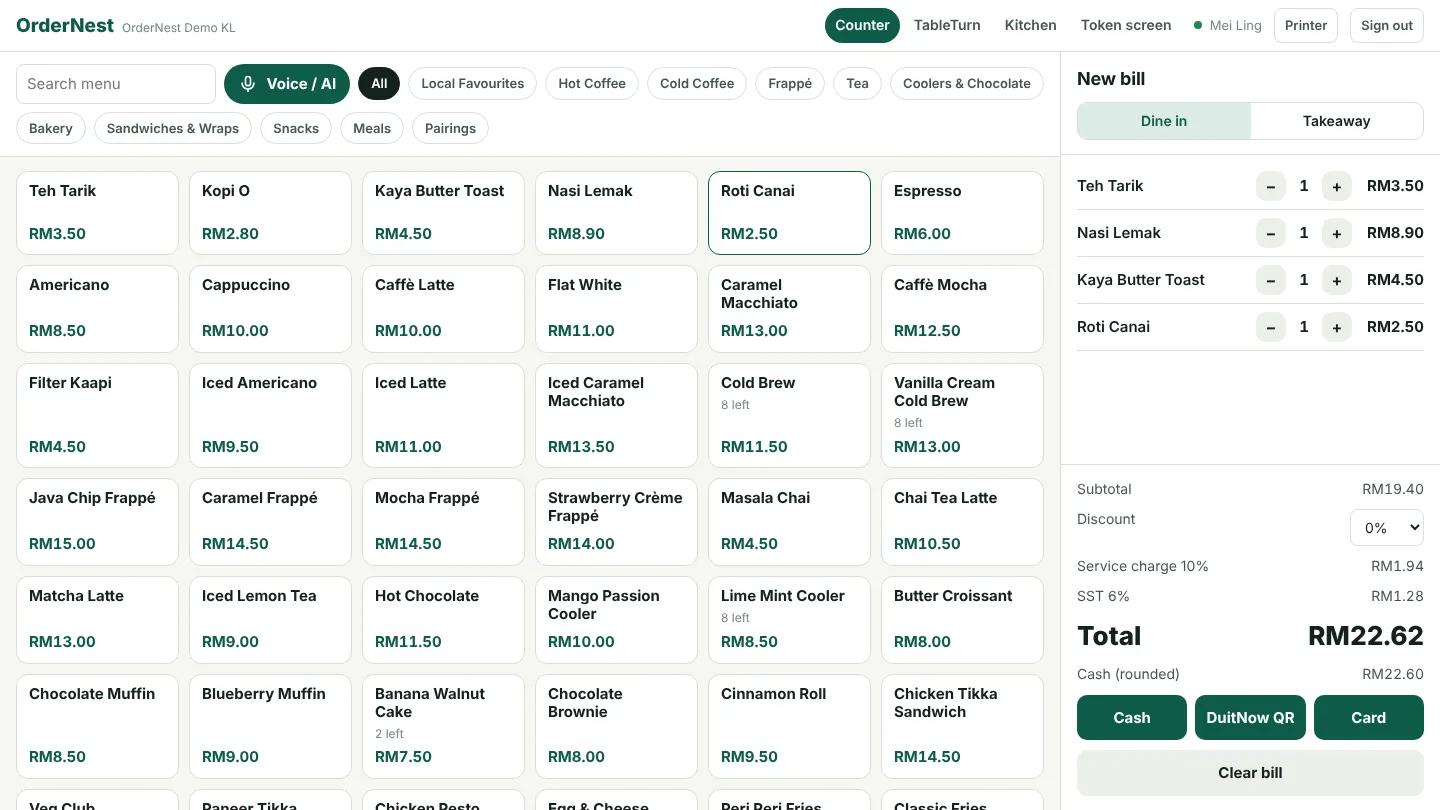
  • Malaysia: prices in RM, SST 6% only once you add your SST number, an optional service charge, cash rounded to 5 sen, SSM and SST numbers, and manual recording of DuitNow payments at the counter
  • Malaysian phone numbers for bookings, catering orders and loyalty
  • Each bill remembers its own tax and service charge, so old bills always print the same
The counter in Malaysia: service charge, SST and cash rounding
Your customers' language

Eight languages on the kiosk

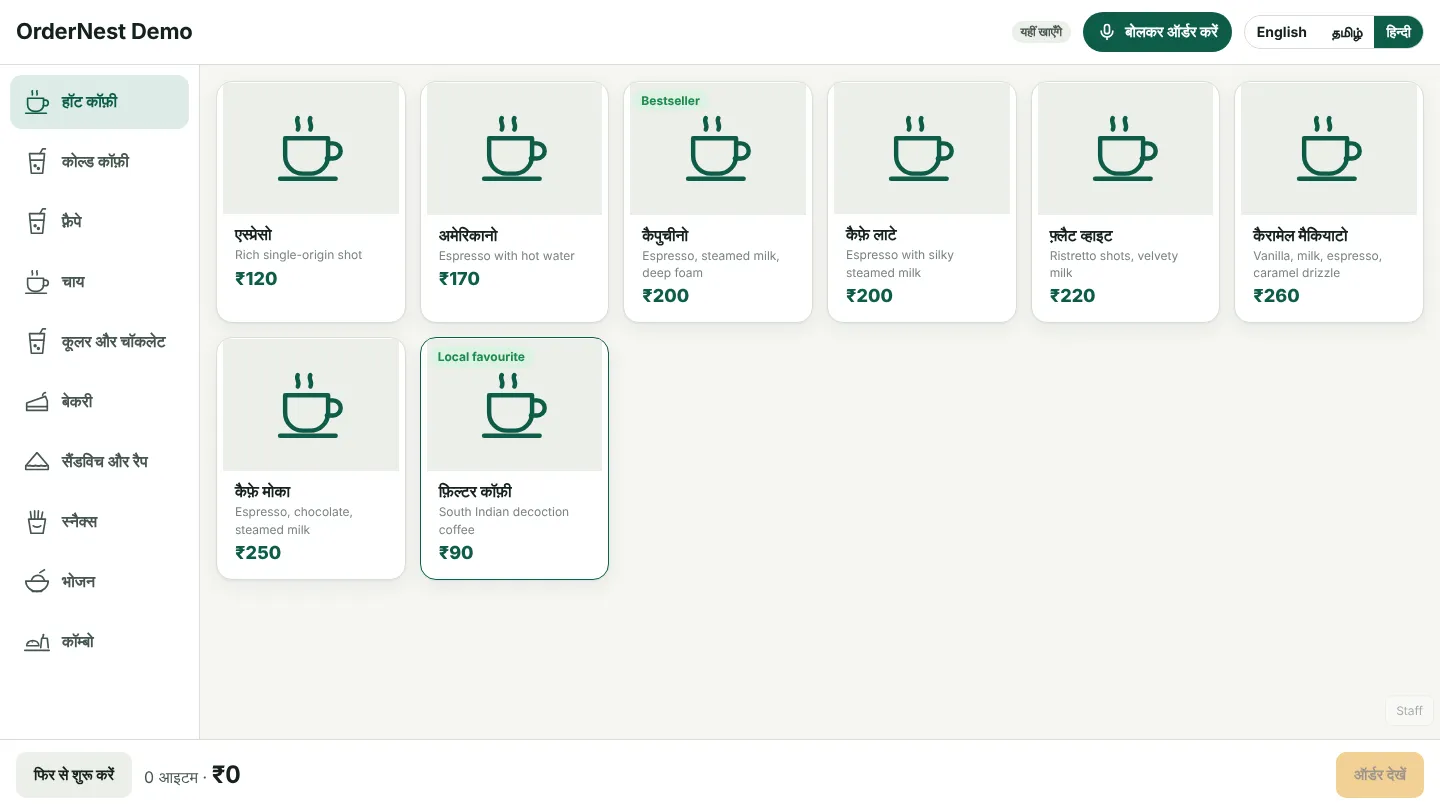
  • English, Tamil, Hindi, Telugu, Malayalam, Kannada, Bahasa Melayu and Chinese
  • Pick up to four for your kiosk; customers tap to switch
  • Type your menu names, or let AI fill them in (Pro)
  • Voice input depends on microphone permission, device language support and provider configuration
The kiosk menu in Hindi
Marketing

Bring customers back

  • Loyalty points with just a mobile number
  • Promo codes with minimum order, limits and expiry
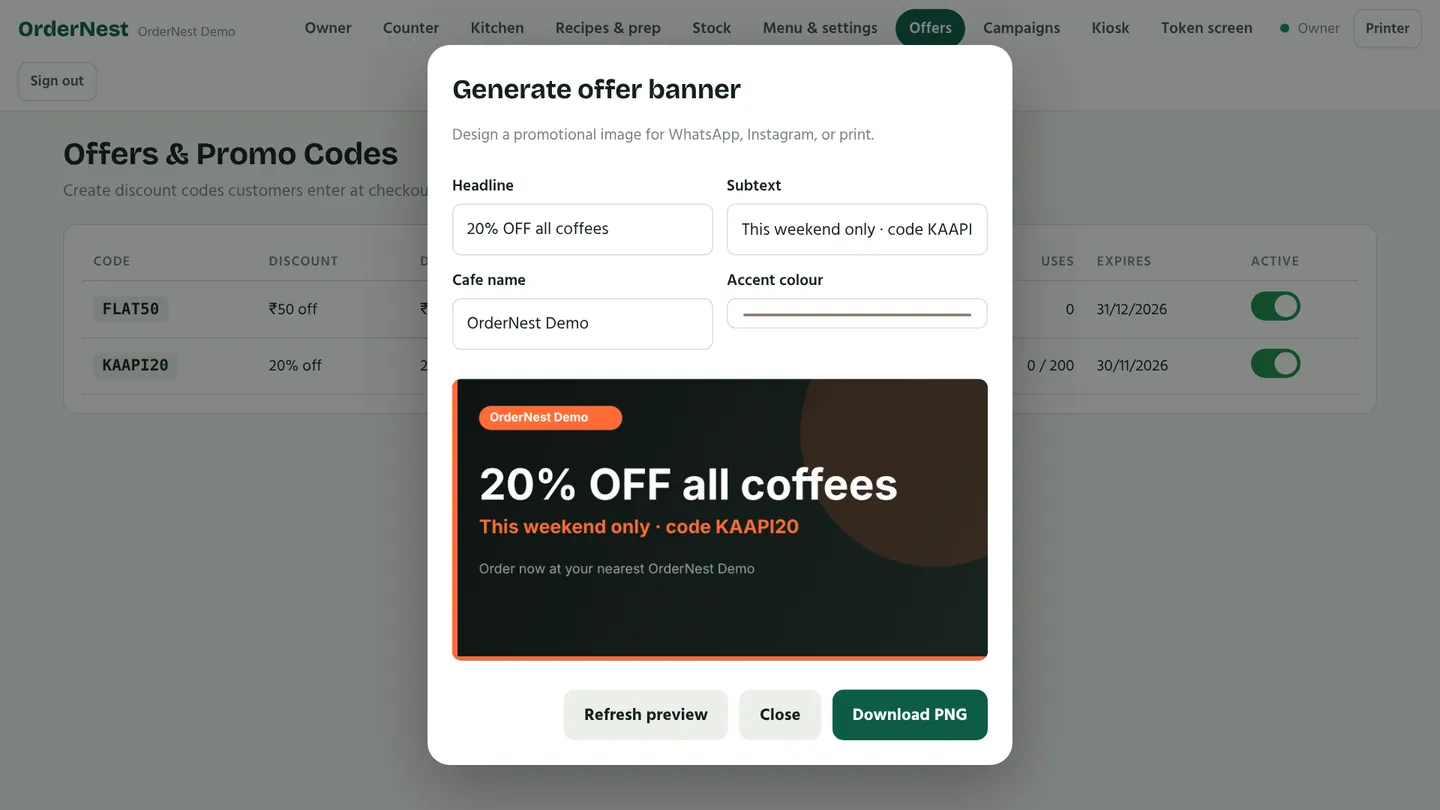
  • Design an offer banner; WhatsApp campaigns require provider setup, customer consent and approved templates where required
  • Import menu items from a photo or platform screenshot with configured AI; this is not live delivery-platform order intake
  • Referral codes give new cafes 30 extra Pro days; referrers get a free month when the new cafe pays
Designing an offer banner
See the whole service

Order. Prepare. Collect. Learn.

Explore the counter, kitchen, token screen and owner reports in the demo options. If a live demo is unavailable, the browser preview is a limited sample with simulated payments.

Plans by country

Start with the right plan for your cafe

Explore India and Malaysia pricing. New accounts have a 30-day Pro trial, subject to the activation window shown in the app.

Current app list prices

Free

₹0 / month

Per cafe / outlet · software only

  • 1 device
  • Up to 50 orders a day
  • Kiosk, counter, kitchen and token views
  • Team roles
Book a walkthrough

Starter

₹999 / month

Per cafe / outlet · software only

  • Up to 5 devices · unlimited orders
  • Offline counter billing
  • Recipes, batch prep and ingredient stock
  • Supplier invoices and wastage
  • Bulk and catering orders
  • Table bookings and waiting list
  • India UPI gateways need merchant setup.
Book a walkthrough

Pro

₹1,999 / month

Per cafe / outlet · software only

  • Everything in Starter
  • Unlimited devices under the current plan
  • AI ordering, menu import and translation tools
  • Owner management from any browser
  • Clean-up tasks with photo proof
  • Customer staff-star feedback
  • India UPI gateways need merchant setup.

AI features require a configured provider; usage and service costs must be agreed at setup.

Book a walkthrough

INR amounts match the app’s current undiscounted list prices. Existing promotions and checkout availability may differ; confirm your quote before subscribing.

Annual amounts are the total for 12 months, paid yearly. Hardware, migration, training and external payment, AI or messaging service costs are quoted separately. Confirm taxes, support coverage and service availability before purchase.

Questions

Good to know

What do I need to start?

A compatible Android tablet for the kiosk and a browser device for the counter or kitchen. A thermal printer and token display are optional. Test the exact hardware models during your pilot; hardware is quoted separately.

Can I try it before my first customer?

Yes. Try the live demo any time, or ask us to turn on practice mode for your own cafe: a sample customer orders about every 5 minutes for a week, so you can watch the kiosk, kitchen screen, token TV and reports working and train your team. Practice bills are marked and are removed when you tap Start selling for real, so your first real bill is bill 1.

Does it work without internet?

Yes, the counter keeps billing offline. Bills are saved on the tablet and sync automatically when the connection returns. UPI on the kiosk needs internet.

Which payments are supported?

In India, UPI through Razorpay or PhonePe with automatic confirmation, plus cash and card at the counter. In Malaysia, cash (rounded to 5 sen), card and manual recording of DuitNow payments at the counter; automatic DuitNow QR generation and payment confirmation are not currently included. Discuss the payment provider before going live.

Does OrdenZ work in Malaysia?

Yes. Choose Malaysia when you sign up: prices are in RM, the kiosk speaks English, Bahasa Melayu and Chinese (Tamil too if you like), and bills show your SSM number. Add your SST registration number to charge 6% SST, and set a service charge if you have one; SST is then charged on the service charge too. Not SST-registered? Leave SST at 0%. We're starting with a few pilot cafes in Malaysia: ask us to join.

How do the Pro trial and billing work?

New cafes get 30 days of Pro, starting with their first real bill. India owners can use configured subscription checkout; Malaysia plans require a quote. Monthly and yearly totals are shown in the pricing section. You can also apply eligible promo codes or sign up with a referral code.

What is TableTurn?

TableTurn manages your tables and your team. Take bookings and keep a waiting list on Starter and Pro. On Pro, when guests leave a clean-up job goes to a staff member, a photo of the clean table makes it free for the next guests, and customers can give staff a star from the QR code on their bill.

Can I take bulk and catering orders?

Yes, on Starter and Pro. Record the customer, where the order came from, the event, who is responsible and the chef. OrdenZ shows what stock to buy, takes the ingredients from your normal stock when cooking starts, and tracks the advance and balance.

Can I manage my cafe from my laptop?

On Pro, yes: sign in from any web browser to manage the menu, stock, reports and settings. On Free and Starter, owner settings are in the OrdenZ app, and the counter, kitchen and stock screens work in any browser.

Which languages does it support?

The kiosk works in English, Tamil, Hindi, Telugu, Malayalam, Kannada, Bahasa Melayu and Chinese; each cafe picks up to four. You can type your menu names in each language, or on Pro let AI fill them in for you to check. Voice input needs microphone permission and compatible device and service support.

Can I control what each staff member sees?

Yes. Give each person a role: manager, captain, chef, cashier, store keeper or cleaning. They sign in with their own PIN and see only the screens for their job. Managers can run the day but can't change your plan or billing. An activity log shows who changed what.

Can I keep track of supplier bills?

Yes, on Starter and Pro. Enter each supplier's bill with its items and GST, add a photo, and the stock and costs update by themselves. You see what you owe each supplier, what's overdue, the GST you paid this month, and your wastage.

What can I try in the demo?

The demo launcher shows the available role previews. When a live demo server is configured, you can explore sample cafe workflows; otherwise use the limited browser preview. Sample payments are simulated. A demo is not a live merchant account or a guarantee of device compatibility.

Can I move from another POS?

You can enter menu items manually or use the Excel setup template. AI image import needs configuration and a review of names and prices. Ask us to assess your current export before switching; historical sales and supplier data are not automatically migrated.

Which connections need extra setup?

Indian automatic UPI confirmation needs an approved and configured payment provider. AI and WhatsApp need their own service credentials and may incur usage fees. Malaysian DuitNow recording is manual; MyInvois submission, live delivery-platform order intake and consolidated multi-outlet reporting are not currently included. Confirm local tax requirements with your adviser.

What should I budget beyond the plan?

Allow for compatible hardware, payment-provider fees and any AI or messaging usage. Discuss setup, migration, training and ongoing support before purchasing. Malaysia subscriptions are quote-based; the displayed pilot prices do not enable MYR checkout.

Who owns my data?

You do. We don't show ads or sell data, and you can delete your cafe account at any time. See our privacy policy.

See OrdenZ at your cafe

Try the live demo now, or ask us for a free walk-through on your own menu.

Build a smoother cafe shift with OrdenZ

Start with one counter and one kitchen screen. Set up your menu, check a complete order and print a test bill before opening time.

For cafes in India

Try English and Tamil ordering, GST bills, stock tracking and supported UPI gateways. Gateway activation and hardware setup are separate.

For cafes in Malaysia

Explore the Malaysian menu and ringgit display in the demo. Confirm local payment, SST and MyInvois requirements with us before going live. Currency support alone is not payment or tax certification.

Book a walkthrough and tell us your number of counters, tablets and printers. We will agree a pilot checklist and support plan with you.

No guaranteed sales increase: track order time, voids, stock variance and returning customers in your pilot.